
If you are Android phone user then you must have seen a folder on your phone named as LOST.DIR. This folder contains a large number of unusable and corrupted files in it. This is because, some users prefer to delete this folder from their phone to free up their device storage.
However, it not always contains the useless data in it. Sometimes this folder often contains some of your important files too.
If you have removed this folder from your phone and now wondering about how to restore lost.dir files Android then you need to read out this post carefully.
Here, you will get to know some of the best ways to restore lost.dir files on Android. Additionally, you will come to know the reasons behind data loss from this folder.
Reasons Behind LOST.DIR Folder Deletion on Android
Well, there are several reasons that can cause the lost.dir deletion on Android. But I am going to mentioned some of the common causes of it.
- Removing or ejecting the SD card from your phone in improper way.
- When your Android OS freezes or crashes abruptly in the midway of operation
- If you stop the downloading process in the middle.
- If you turn off your device while read or write process is going on.
- Battery malfunctions etc.
These are some of the possible causes when you may lose your lost.dir files from your Android phone.
How to Recover Lost.Dir Files on Android?
In this section, you are going to learn how to restore lost.dir files Android by performing few simple steps.
#Recover Lost.Dir by Renaming the Extension Name
The files exist in a Lost.Dir folder are generally available in the undetectable extension, that makes them completely unrecognizable.
Thus, in order to recover files from lost.dir, you will need to bring all the data back into the acceptable extension.
Follow the below given steps to know how to do so:
Step 1: Firstly, you need to open your File Manager app then find the Lost.Dir Folder from it.
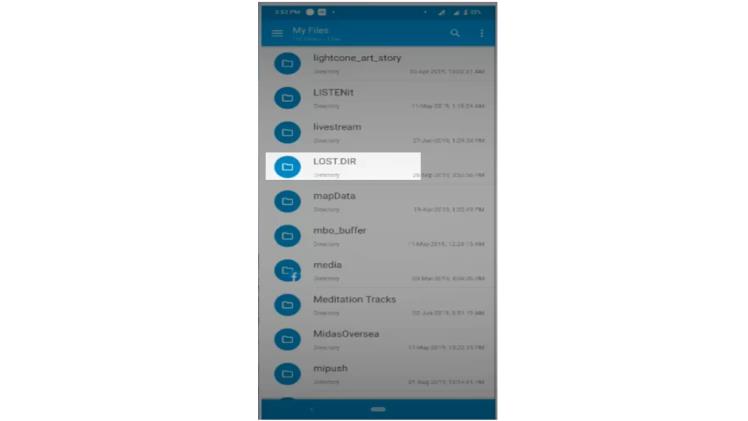
Step 2: From the Lost.Dir files list, you need to select any one of them.
Step 3: From a menu, you have to select the “Rename” option.
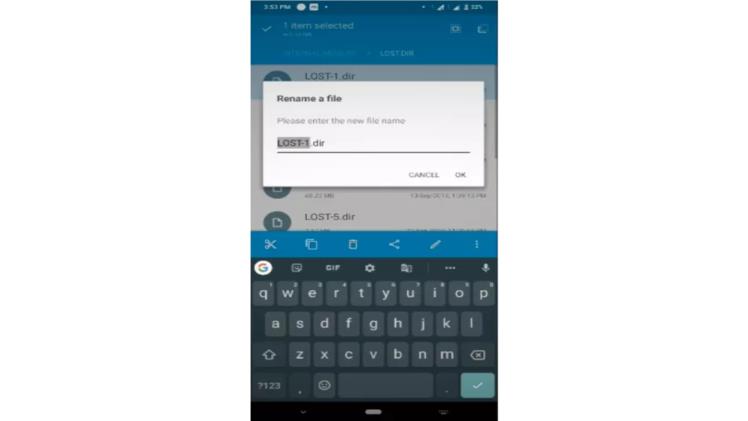
Step 4: This time, you need to change the extension to any reasonable format.
Step 5: Now, just save it & again try opening the particular file.
Step 5: In case, it doesn’t work then simply replace the extension.
How to Copy the Restored Files to LOST.DIR Folder?
Once the restoration process is over, then you can simply copy & save the LOST.DIR files in your LOST.DIR files folder.
However, in case you recovered the files using PC then you can simply copy the files to your memory card or Android LOST.DIR.
To know the process, start following the below given steps:
- Firstly, you need to connect your Android phone or microSD card to your computer via data cable.
- Make sure your able to reads your device.
- Then select your restored files from a PC.
- Next, open Android then open its internal storage.
- Now, you need to open a DIR folder then paste the files here.
- After pasting them, restart your device. You will able to view and access your recovered LOST.DIR files.
- In this way, you’ll be able to restore your LOST.DIR files in your phone.
Prevention Tips: How to Avoid LOST.DIR files Deletion on Android
These are some of the important tips that will help you to prevent your LOST.DIR files from further deletion. So, you need to read all of them carefully:
- Never try to force restart your Android phone.
- Always unmounts your memory card before removing from your device.
- Don’t remove the SD card during transferring data from device to SD card or vice-versa.
- Keep cleaning your Android phone cache or junk from time to time.
- Never try to disconnect the internet connection while updating or downloading process is going on.
- Uninstall the unused apps when needed.
Time To Wrap Up
This article is all about how to restore lost.dir files Android. So, if you have deleted your lost.dir files from Android mistakenly then you can try out the above-mentioned solutions to recover lost.dir on Android.
Along with that, I have also mentioned some of the prevention tips that will help you to avoid the lost.dir files deletion in future.
If this post helped you to recover your lost.dir files, don’t forget to share it with your friends & colleagues.